Download The Official FlixFox App: Choice of Millions of Indians
FlixFox has turned into a popular entertainment streaming app in India. And why not? We have something to offer to people of different age groups. Whether you want to watch superhit Bollywood movies, Hindi-dubbed Hollywood classics, or action-packed South-Indian films, FlixFox offers everything.
Gen Zs are enjoying our anime content, reality shows, and popular Indian web series in one place. If you have been missing all this fun due to the hefty subscriptions of premium streaming apps, download the FlixFox app now.
Specifications of FlixFox
Specifications of FlixFox
FlixFox APK is a lightweight, third-party app for Android devices. It provides two options for streaming. You can either choose the premium plan or continue with the ad-supported free content. Refer to the following table for technical specifications:
- App Name
- FlixFox APK
- Size
- 57.3 MB
- Category
- Entertainment
- Android Version
- 6.0 or Above
- Latest Version
- v2.0.8
- License
- Free
Why Download FlixFox From This Source?
Why Download FlixFox From This Source?
In the recent past, we have observed tremendous growth in our user base. Thanks to word of mouth, our number of downloads is growing fast. However, it brings added responsibility for us to provide a safe app downloading environment for our potential users.
Quick Download: You can download the FlixFox app in no time, thanks to our own servers having cached APK files of the app.
Highly Secured: No pop-ups, no suspicious links, and no fear of installing modified APK files. Just verified APK files scanned for viruses.
Current Version: Here you can find the latest version of the FlixFox app.
FlixFox Installation Steps for a Phone
FlixFox Installation Steps for a Phone
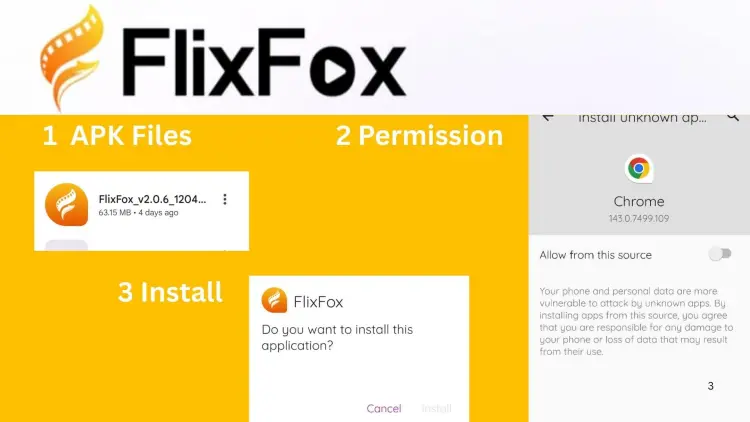
Installing FlixFox on a smartphone is pretty straightforward, takes only a couple of steps and minutes.
1
Step 1
First, download FlixFox v2.0.8 from this page. It will download the APK file to your phone.
2
Step 2
Your Android phone will ask for permission before installing FlixFox. Don’t worry, it is a usual step for apps downloaded outside the Google Play Store. Enable “Install Unknown Apps” and give permission to the source.
3
Step 3
Find the downloaded file in your phone’s File folder and hit the “Install” button. That’s all.
FlixFox Installation on Television
FlixFox Installation on Television
People can also install FlixFox on a smart Android TV. We are giving a free 5-day premium trial to new TV users.
Follow the steps below for easy downloading:
Download the FlixFox APK file on your smart TV set using its browser. Use our official source to download the file. Alternatively, you can download it on your laptop/pc first and then transfer it using a USB.
Next, install the app on your TV using the file. Like a phone, your TV may need permission. Turn on “Unknown Source” in Settings, and provide permission.
Now you’re ready to experience entertainment on a big screen.
FlixFox Common Installation Errors & Troubleshooting
FlixFox Common Installation Errors & Troubleshooting
While this is not common, some users might face technical issues when trying to install the FlixFox application. Fortunately, you can resolve most of them with easy steps.
App is Not Getting Downloaded
If you are not able to download the app, possibly it could be due to a lack of storage space in your device. You can delete some old files or apps from the Files folder of your phone. Apart from this, you can also check for permission issues. Ensure you have given the app the necessary permissions.
Sometimes, having an older version of FlixFox installed may cause a failed installation. Check if you have an old FlixFox app version on your phone already. In that case, you will have to uninstall that version before downloading the app again.
Parse Error
It happens when you try to install the app using a corrupt APK file, or your device is not compatible with the required operating system. Make sure your device is compatible with the existing version of FlixFox. Also, check for the authenticity of the downloaded file.
Interrupted Downloads
In most cases, a slow internet connection is the culprit behind these download interruptions. Switch to stable connectivity and try redownloading the app.
from here.
Frequently Asked Questions
Frequently Asked Questions
Is the FlixFox app available on the Google Play Store?
No, FlixFox is not listed there at the moment. You can download our official app from our website.
Can I install it on my old, low-RAM tablet?
Yes, FlixFox works fine on all smart devices as long as they meet our lowest Android requirement.
Do I need to give my personal information to register for the app?
No, FlixFox does not ask for any personal information. You only need to provide basic details, just like with other applications. To get a personalized experience and purchase premium service, you can log in using your phone number, WhatsApp, or Google account. Nevertheless, we don't force people to reveal their identity, bank account details, and other crucial information.
Can I install FlixFox on Windows?
You can download the app file on your computer, but you can't install and use it on any Windows operating system. FlixFox is purely an Android app.
Does FlixFox allow you to adjust video quality?
Yes, you can make changes to the quality of the video. You can switch between SD 480P and HD 720P to manage your data consumption. You will need to buy a premium plan to access content in full HD.
Can I operate the app in any language other than English?
Yes, the app gives you options to choose your preferred language. You can select Hindi or other regional Indian languages as per your choice.
How to avoid downloading similar-looking fake FlixFox apps?
Check for the app name, logo, and other specifications carefully when searching for FlixFox on Google and other search engines. Always look for a trusted source like this before downloading it.